#1 Internet Filter for Mobile Devices
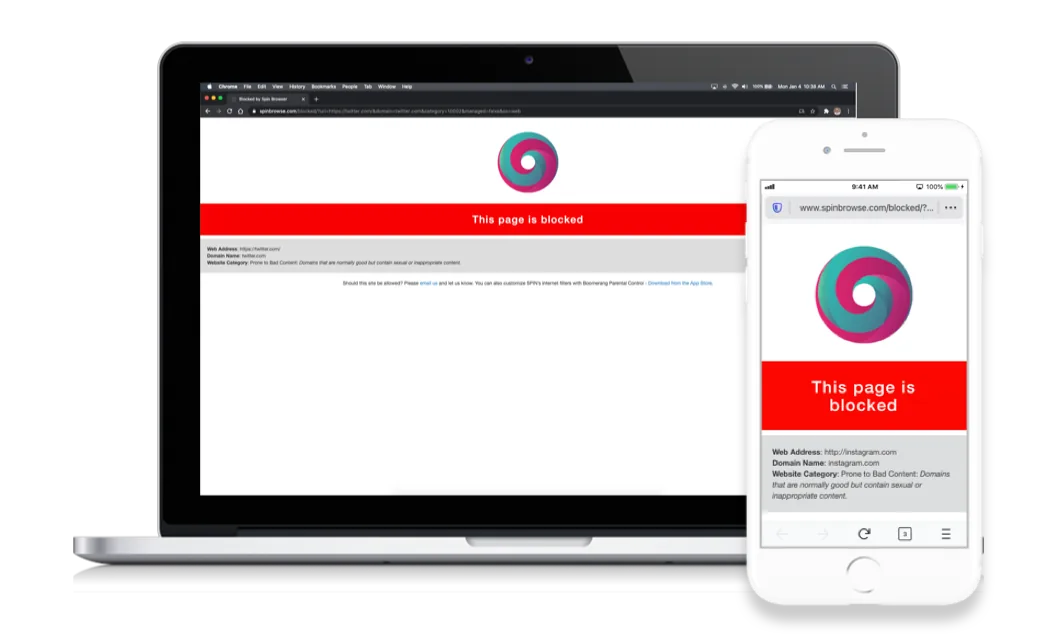
SPIN Safe Browser is a fully featured web browser with integrated internet filters that even blocks the grey area of websites that are normally good but are prone to bad content.
Available for Android, iOS and as a web browser extension for Chrome and Firefox.
Schools and Businesses

Protect students and employees by reducing the risk of accessing inappropriate online content, lighten workload and minimize online issues. Organizations that use that use AppConfig-compatible mobile device management solutions such as Jamf Pro and Jamf School can fully customize the following features in SPIN Safe Browser:
● Edit Content Filters ● Set list of blocked websites ● Set list of allowed websites ● Deploy Bookmarks ● Set and enforce Homepage website ● Set and enforce New Tab behaviour
Available via the Apple Business Manager or Apple School Manager as one-time purchase. Schools can take advantage of Apple School Manager’s 50% EDU discount on purchases of 20 or more!

Families and Individuals

Safe browsing is not included on Android and Apple iOS mobile devices – make SPIN Safe Browser your default browser. SPIN automatically enforces content categories that provide safe browsing, enforces safe searches Google, DuckDuckGo, Ecosia and Bing plus requires no configuration by the parent/guardian/user.
SPIN+ Customize your Safe Browsing Experience
Subscribe to SPIN+ to bring additional flexibility to your safe browsing experience with these features: ✅ Allow any domains* 🛑 Block any domains 🔑 Set a Passcode for your SPIN+ settings ⬇️ Save and restore your settings, including Bookmarks *Pornography and Nudity domains cannot be allowed Monthly and Yearly subscriptions offered. Pricing is listed on our App Store and Google Play app listings.

Why SPIN Safe Browser
No filter is perfect. This is why we listen to our users’ feedback and block the grey area of sites that are prone to bad content and unblock sites that are good but are accidentally blocked since some robot was just not that smart!
Report a website.
Content Categories automatically blocked ⊕ Prone to Bad Content (websites that are normally good but may contain sexual or inappropriate content) ⊕ Pornography and Adult Content ⊕ Nudity ⊕ Unsafe Search Engines ⊕ File Sharing / Peer to Peer sites ⊕ VPN and Proxy sites
Safe Search Strongly Enforced
SPIN Safe Browser automatically enforces safe search and image results in the following popular search engines: Google, DuckDuckGo, Ecosia, Bing.
SafeSearch results available for:




Benefits of SPIN Safe Browser
Safe Browsing Tips
Check out a few tips on how to make your SPIN Safe Browser experience better.
How to make SPIN Safe Browser your default Android browser
How to make SPIN Safe Browser your default iOS browser
Highly Rated and Loved by Users
SPIN Browser is definitely the best solution for letting your kids surf the web freely on Android. I tried them all and this is the most simple and effective solution.
This is a brilliant app which is excellent at blocking inappropriate content.
Personally I think I like it better than Google.
Really perfect. The best browser with the best filtering. It is really safe to use. It is the best browser I’ve ever had and is build upon Firefox, which gives you a way better experience than Chrome on mobile.
More Ways to customize SPIN Safe Browser
More ways to customize SPIN Safe Browser
Families with Kids: Boomerang Parental Control offers screen time controls, app controls, location tracking and smartphone safety.
Self managing individuals: Web Filter for Chrome offers app controls, additional browsing features for those looking to self manage their Android phone experience.
Available on the following platforms
SPIN Safe Browser works on Android, iOS and as a web browser add-on for Chrome and Firefox. Schools and Businesses looking to customize SPIN on their iOS devices must use our AppConfig-compatible version available on the App Store.